

Now Reading: What Is Prisma Access? Full 2026 Guide on Browser, Agent, DLP & Locations
-
01
What Is Prisma Access? Full 2026 Guide on Browser, Agent, DLP & Locations


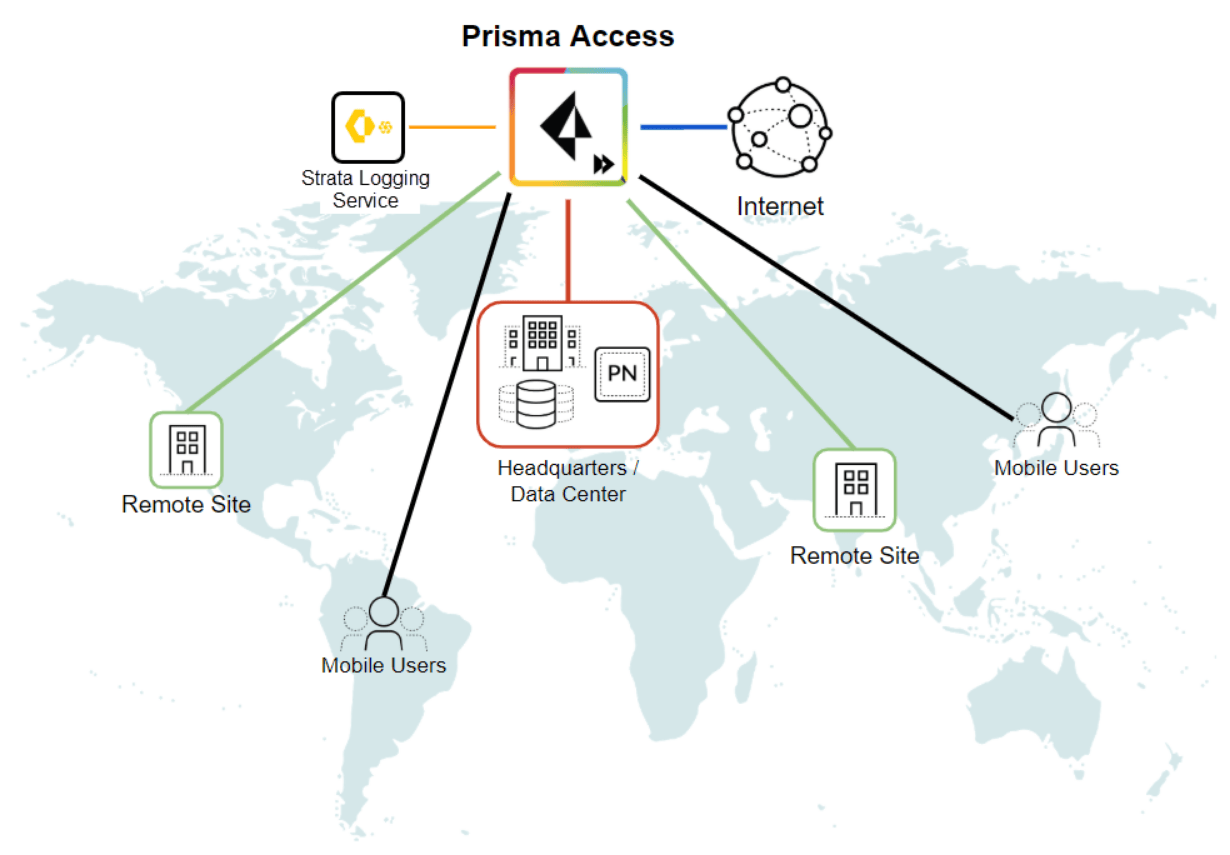
In 2026, modern businesses rely heavily on cloud systems, remote workforces, and global connectivity. With this rapid shift, security teams need a platform that protects users, devices, and data everywhere. Prisma Access has become one of the most trusted cloud-based security solutions for securing mobile employees, branch offices, SaaS applications, and internal networks.
This complete 2026 guide explains how Prisma Access works, the role of the Prisma Access browser, Prisma Access agent, DLP capabilities, and global location coverage. You will also learn why organizations choose it, how it helps secure hybrid work, and why it’s leading the future of cloud-delivered security.
Understanding Prisma Access in 2026
Remote work, unmanaged devices, and cloud applications have increased security challenges. Traditional VPNs and firewalls can’t handle global users at scale. That’s where Prisma Access comes in, offering a unified, cloud-delivered security platform built on Zero Trust principles.
Prisma Access protects:
- Remote workers
- Branch offices
- Corporate applications
- Cloud services
- SaaS tools
- Sensitive data
Its architecture ensures every connection—whether from an office or a home WiFi—is inspected, encrypted, and verified.
How Prisma Access Works (Simple Explanation)
The platform uses cloud firewalls, secure web gateways, Zero Trust access, and AI-driven threat prevention to protect users. All traffic is routed through the nearest cloud location, where policies are applied.
Key components include:
- Identity-based access
- Device posture checks
- Secure browsing
- Threat and malware detection
- Data Loss Prevention
- Application access control
This makes Prisma Access suitable for enterprises that need scalable, cloud-ready security.
Prisma Access Browser (Secure Cloud Browser)
The Prisma Access browser provides a remote, cloud-hosted browsing environment that isolates risky websites. Instead of loading a site directly on the user’s device, it opens inside a secure cloud session.
Why organizations use secure browser isolation:
- Prevents malware from reaching endpoints
- Stops drive-by downloads
- Blocks malicious scripts
- Protects unmanaged devices
- Works seamlessly with DLP
This browser isolation technology enhances both security and user experience.
Prisma Access Agent (Endpoint Client for Users)
The Prisma Access agent is installed on laptops and mobile devices to establish a secure connection. It automatically identifies the safest path for traffic and applies policies based on identity, location, and device posture.
Key benefits include:
- Always-on secure connection
- Zero Trust enforcement
- Multi-factor authentication support
- Real-time threat inspection
- Access to private and SaaS apps
- Strong performance with low latency
The agent is available for Windows, macOS, iOS, Android, and Linux.
Prisma Access DLP Features (Data Loss Prevention)
Data Loss Prevention has become essential in 2026, especially with cloud usage and remote devices. The Prisma Acces DLP engine scans data in real-time and prevents unauthorized sharing or leakage.
Notable DLP capabilities:
- Scans uploads, downloads, and copy/paste actions
- Detects sensitive data like PII, PCI, and PHI
- Applies inline blocking policies
- Works with the secure browser
- Uses AI models to identify risky behavior
- Monitors cloud apps like Google Drive and OneDrive
The combination of secure browsing and strong DLP makes Prisma Acces ideal for compliance-focused industries such as finance, healthcare, and government.
Prisma Access Global Locations (2026 Coverage)
To ensure fast, reliable security, the platform operates through global cloud locations across different regions. These locations help users connect to the nearest access point with minimal delay.
Major regions include:
- United States
- Canada
- United Kingdom
- Germany
- Netherlands
- France
- India
- Singapore
- Japan
- Australia
- Brazil
- UAE
- South Africa
Each location supports full security inspection, Zero Trust workflows, and traffic optimization.
Why Businesses Choose Prisma Access
Enterprises choose this platform because it centralizes cloud security into one service. Whether users are at home, traveling, or in branch offices, security stays consistent.
Main advantages:
- Cloud-native scalability
- Faster deployment than hardware firewalls
- Unified management console
- Reduced IT overhead
- AI-powered threat detection
- Strong support for remote and hybrid teams
Most important, Prisma Acces avoids the weaknesses of legacy VPNs by providing continuous identity checks, network segmentation, and protected tunnels.
Prisma Access Use Cases (Real-World Examples)
1. Remote Employee Security
Users connect from anywhere with Zero Trust policies.
2. Contractor & Vendor Access
Use browser isolation for unmanaged or temporary devices.
3. Secure SaaS Application Access
Protects Office 365, Salesforce, Google Workspace, and other cloud apps.
4. Branch Office Replacement
Instead of hardware appliances, offices use cloud-based tunnels.
5. Protection for Regulated Industries
Healthcare and finance rely heavily on DLP and cloud firewalling.
6. Cloud Migration Support
Organizations transitioning from on-prem systems to cloud environments secure connections via Prisma.
Challenges When Deploying Prisma Access
Although powerful, enterprises must consider:
- correct licensing selection
- proper onboarding for users
- device posture rule configuration
- integration with identity providers
- monitoring and log analytics
Training teams on policies ensures smooth rollouts.
FAQ Section
1. What is Prisma Access used for?
It secures remote users, branch offices, and cloud applications through a cloud-delivered security platform.
2. Does Prisma Acces support secure browsing?
Yes, the Prisma Acces browser provides remote browser isolation for high-risk sites.
3. Is the Prisma Access agent required?
The agent is required for full Zero Trust access from laptops and mobile devices.
4. Can Prisma Access prevent data leakage?
Yes, with powerful DLP features that scan and block sensitive data exposures.
5. Where are Prisma Access locations available?
There are global locations across North America, Europe, Asia, Middle East, Africa, and South America.
Conclusion
As organizations transition to cloud-first, remote-friendly environments, strong cloud-delivered security becomes essential. Prisma Acces provides a complete platform for protecting users, applications, and data from anywhere. With browser isolation, endpoint agents, advanced DLP, and global coverage, Prisma Acces supports the security needs of modern enterprises in 2026 and beyond.